Pianotech

  • 1.  Pianomation repair

    Posted 08-03-2016 17:32

    I have a customer with a Wurlitzer grand piano, in which she had a Pianomation player installed many years ago. She asked me to troubleshoot it. What I found was that when inserting a CD and closing the CD drawer, I can hear the CD player attempt to spin the CD, then it makes strange clicking sounds and then it tries again to spin the CD. This happens over and over endlessly. 

    I sent an email to the Pianomation using the support page of their website and never received any reply. Does anyone have any advice on getting on of these things repaired?

    ------------------------------
    Gary Howell
    Melbourne FL
    [http://www.cranecreekpianos.com/]
    ------------------------------


  • 2.  RE: Pianomation repair

    Posted 08-03-2016 19:07

    Upgrade to PMII

    ------------------------------
    Regards,

    Jon Page


  • 3.  RE: Pianomation repair

    Member
    Posted 08-03-2016 20:46

    You may be able to find a used "front end" cd player unit on ebay or from someone doing upgrades to the more current technology that eliminates the cd player. The model name and/or model number should be stamped or printed on the unit. I have done a number of upgrades on these systems to the new wireless models however the client may not want to spend what it takes to upgrade. Best thing in this situation is to find someone in your area that does QRS/Pianomation work or attend certification training. The cd players are one of the weakest links in the player system because they are mechanical. The current version of QRS is PNOmation III

    ------------------------------
    James Kelly
    Pawleys Island SC
    843-325-4357


  • 4.  RE: Pianomation repair

    Registered Piano Technician
    Posted 08-03-2016 22:30
    814-676-6683 is the QRS phone number. Ask for Steve, although others
    could help you. And, definitely, PM III is the way to go. Clark
    --
    Clark A. Sprague, RPT csprague4@woh.rr.com www.clarkspianoservice.com


  • 5.  RE: Pianomation repair

    Registered Piano Technician
    Posted 08-03-2016 23:56

    Several things could be happening.

    The CD you are attempting to play is damaged and can't be read.

    The optics are damaged and can't read the disc.

    The optics are dirty and can't see the disc.

    In regards to that last one, I have had occasional good results by simply blowing out the player with canned air. That will also sometimes clear up problems with floppy drives that can no longer read the floppies. Dust accumulates and builds up to the point where the optics or the magnetic heads simply can't access the data. 

    ------------------------------
    Geoff Sykes, RPT
    Los Angeles CA


  • 6.  RE: Pianomation repair

    Posted 08-07-2016 14:27

    Here is what I did to solve the problem:

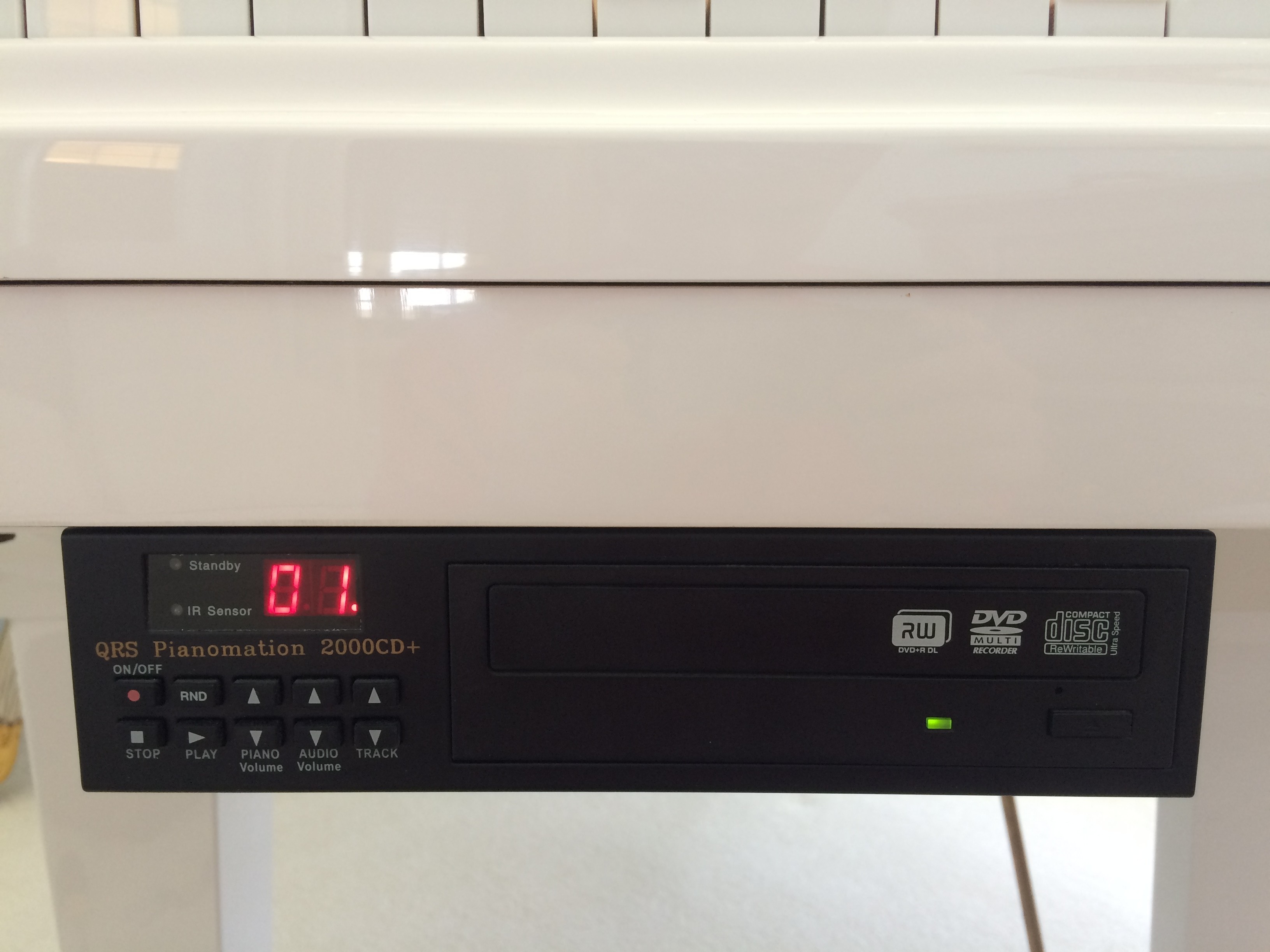
    When I first examined the faulty Pianomation unit, I took notice of the fact that the CD ROM was a standard desktop computer CD ROM. I had a hunch, which was confirmed by the responses on this thread. I went to my local computer-scrap-recycling store, but there I found they carried only DVD ROMs (all desktop computers have come standard with DVD players for many years now) so I went to the store owner and explained my dilemma. He assured me that DVD players were backwards compatible with all CD players.  So I paid the $10.99 for the DVD ROM, I went to the customers house and removed the Pianomation CD controller from the piano. I removed the cover and, sure enough, needed only to unscrew four screws to remove the CD ROM and install the DVD ROM. Once finished the player piano worked perfectly. It may appear odd that a piano has a DVD player in it, obviously no one is going to be watching Pirates Of The Caribbean on her piano, but as for the player mechanism, it works perfectly.
    m6hqM59PR5q9VB5TC2dV_piano_mation.JPG

    ------------------------------
    Gary Howell
    Melbourne FL
    [http://www.cranecreekpianos.com/]


  • 7.  RE: Pianomation repair

    Registered Piano Technician
    Posted 08-07-2016 15:25

    Hi Gary,

    Very well done!

    Thank you for including the instructions and graphic so that others can solve the same problem if encountered again.

    *Note: I just noticed that in your profile, you have accidentally encoded the 'right bracket' into your link. If someone clicks on that link (when replying to your message by email - the link problem doesn't display here), they will get the 500 Internal Server Error.

    Your profile info as currently displayed is:

    Gary Howell
    Melbourne FL
    [www.cranecreekpianos.com/]

    To correct the link problem, just remove the right bracket from the coding:

    [www.cranecreekpianos.com/]

    Regards,

    Paul

    ------------------------------
    Paul Brown, RPT
    Vancouver, BC Canada
    Email: paulbrn@telus.net


  • 8.  RE: Pianomation repair

    Registered Piano Technician
    Posted 08-07-2016 15:31

    Hi again Gary,

    I forgot to make the change (not in your profile but in my reply) to the link so email users will see the corrected version.

    Paul.

    ------------------------------
    Paul Brown, RPT
    Vancouver, BC Canada
    Email: paulbrn@telus.net


  • 9.  RE: Pianomation repair

    Registered Piano Technician
    Posted 08-07-2016 16:05
    Outstanding. One to keep in the old memory banks. Thank you! Clark
    --
    Clark A. Sprague, RPT www.clarkspianoservice.com


  • 10.  RE: Pianomation repair

    Posted 08-08-2016 04:30
    Well done, Gary! You took the plunge and it paid off - combining IT with PT.  Aren't computer-scrap-recycling stores fun! Michael  UK